Guided Reorder Point Calculation
The Guided Reorder Point (Guided ROP) is a Propel Rx calculated reorder point based on volume of prescriptions dispensed and forecasted need. It is displayed in the Drug Folder Inventory tab for a product, regardless of its reorder method, when the Guided Reordering pharmacy preference is enabled. If a product is set to use Guided Reordering, this value determines when and how much of a product should be ordered at a given time.
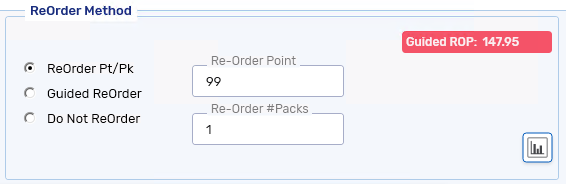
Both the Guided ROP and reorder quantity are dynamic calculations based on the following formulas:
Guided ROP* = Calculated Units x Days Supply
Guided Reorder Quantity = (Owe Balance(s) + [Guided ROP + Safe Supply]) - (Actual on Hand + On Order)
*Guided ROP for unmonitored drugs will display as 0.
The Guided Reorder Point (Guided ROP) is a Propel Rx calculated reorder point based on volume of prescriptions dispensed and forecasted need. It can be used as reference when evaluating the reorder point for a product.
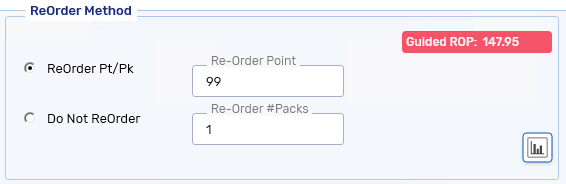
The Guided ROP is a dynamic calculation based on the following formula:
Guided ROP = Calculated Units x Days Supply
To learn more about the variables in these calculations, select the dropdowns below.
 Calculated Units
Calculated Units is the average daily units dispensed over the Rx History period set for a product. If a different value is not set at the product level, the Rx History period set at the pharmacy level will be used to determine the Calculated Units value.
For information on setting the Rx History period at product level, see Setting Guided Reordering for a Product. For information on setting it at the pharmacy level, see Setting the Guided Reordering Preference.
If the product is part of an Order Group, the dispense history of all members in the group is combined for the calculation.
Calculated Units is based on the two highest dispense days over a period of 365 days. If the difference between the two days is equal to or less than 20%, the highest day dispense volume is used. If the difference is greater than 20%, the calculation is based on the second highest day.
Days Supply
Days Supply is the minimum days worth of stock you want to keep on your shelves (between 1 and 365). If a different value is not set at the product level, the Days Supply set at the pharmacy level will be used for the calculation.
For information on setting the Days Supply at product level, see Setting Guided Reordering for a Product. For information on setting it at the pharmacy level, see Setting the Guided Reordering Preference.
Days Supply is the minimum days worth of stock to keep on your shelf. By default, this is set to 1.
Safe Supply
Safe Supply is a buffer added to the Guided ROP calculation to ensure your pharmacy maintains extra stock beyond what is required based on dispensing history. It can be expressed either as a percentage of the average daily units dispensed or based on the units needed for prescriptions due within a set number of days. If a different value is not set at the product level, the Safe Supply set at the pharmacy level will be used for the calculation.
For information on setting the Safe Supply at product level, see Setting Guided Reordering for a Product. For information on setting it at the pharmacy level, see Setting the Guided Reordering Preference.
Guided Reorder Point Recalculation Triggers
The Guided ROP is recalculated in several scenarios. However, not all triggers will cause a change in the Guided ROP. If the recalculation does not result in a difference to the quantity ordered for a product, the Guided ROP does not get updated in the Drug Folder.
If a product has not been dispensed in the last 200 days, a nightly event will set the Guided ROP automatically to -1.
Triggers
-
When a Drug Folder is opened if more than 24 hours have passed since the last calculation.
-
When a prescription is filled or reversed.
-
When the Days Supply, Rx History, and Safe Supply fields are updated.
-
When a product is deleted centrally (recalculation occurs on the first fill).